
Convert your music to the format you need.
FLAC to AIFF for the CDJ, WAV to MP3 so it fits on the USB stick, or MP3 to whatever your DJ app asks for. Surco converts in any direction and carries the tags, the artwork and the Traktor cues along with the audio.
macOS, Windows and Linux. No account, no subscription.
In
- WAV
- FLAC
- AIFF
- ALAC
- MP3
- M4A
- AAC
- OGG
- OPUS
↓ in any direction
Out
- AIFF
- WAV
- FLAC
- ALAC
- MP3
- Tags and artwork
- Traktor cues and beatgrid
- Bit depth and sample rate, unless you change them
- In batches and in parallel
What comes across
Whatever the file carries makes it to the new format
Each format stores tags its own way. Surco rewrites them in the form the target format expects.
| In the source | In the copy | How |
|---|---|---|
| Audio✓ No loss between lossless formats | ✓ No loss between lossless formats | Between AIFF, WAV, FLAC and ALAC the samples are the same. For MP3 you pick the quality, from 320 down to 128 kbps or VBR V0/V2. |
| Tags✓ Kept | ✓ Kept | They take the target format's form, ID3 in AIFF, WAV and MP3, Vorbis comments in FLAC and MP4 atoms in ALAC. |
| Artwork✓ Kept | ✓ Kept | It's embedded in the copy, in a WAV too. |
| Traktor cues✓ Kept | ✓ Kept | Between MP3, AIFF, FLAC and WAV in any combination, with the MP3 offset compensated. Only ALAC has nowhere to keep them. |
| Same format✓ No re-encode | ✓ No re-encode | If the file is already in that format, it's copied as is and only the tags are rewritten. |
What for
Each format for its own job
AIFF, the one everything reads
Lossless, with tags and artwork, and every CDJ and every DJ app reads it.
MP3, so it fits
A 320 kbps MP3 takes about a quarter of the space of an AIFF. For a small USB stick or for listening outside the booth.
FLAC and ALAC, for archiving
Lossless and compressed, they take up a good deal less than an AIFF. ALAC also plays in Apple Music, and FLAC doesn't.
How to
Convert in three steps
- 1
Drop the files
Drag a file in any format, a selection or a whole folder onto Surco.
- 2
Pick the format
AIFF, WAV, FLAC, ALAC or MP3, in the menu next to the convert button. With several tracks, also “Same as source”.
- 3
Convert
The copies go to Music/Surco, next to the original or to Apple Music, and rekordbox, Engine DJ, Traktor, Serato and VirtualDJ are brought up to date if you sync them.
Before you convert
Is your lossless really lossless?
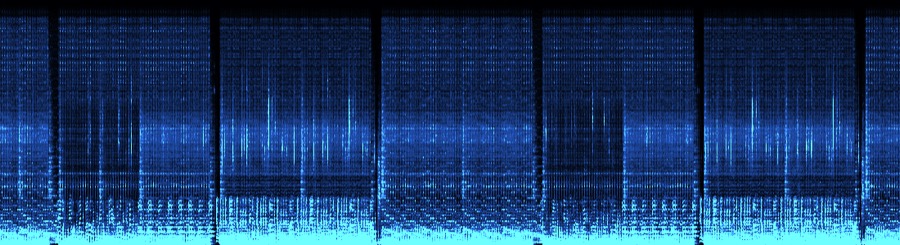
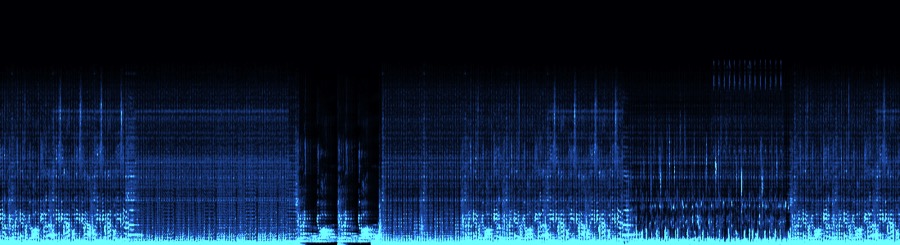
An MP3 converted to FLAC, WAV or AIFF weighs the same as the real thing. The spectrum gives it away, because the sound stops at a hard wall. Surco checks every track before you convert it.
FAQ
Questions about converting
Which formats can I convert?
In go WAV, FLAC, AIFF, ALAC, MP3, M4A, AAC, OGG and OPUS. Out come AIFF, WAV, FLAC, ALAC and MP3, any to any.
Do I lose quality when converting?
Not between lossless formats, because the samples are the same. Going to MP3 loses some, as with any MP3, and you choose how much with the bitrate. Turning an MP3 into an AIFF doesn't bring the quality back, it only makes it bigger.
Are my originals touched?
When you change format, the copy goes to a separate folder and the original stays where it was. If the copy replaces the old one in your library, Surco removes the old one once it has checked the new one, to the Trash or to Backups.
Can I convert a whole folder at once?
Yes. Drop the folder and convert everything in one go. Conversions run in parallel.
Does it work on Windows?
Yes. Surco runs on macOS (Apple Silicon and Intel), Windows and Linux.
Convert your music
Surco also tags from Discogs, Bandcamp, Deezer, Beatport and MusicBrainz and files everything into your library.